Apollo Logo
Apollo
Checklists built for Jira teams
Apollo brings structured task management directly into your Jira issues. Break down complex work, track progress, assign work, and keep your team accountable without leaving the platform you already use.
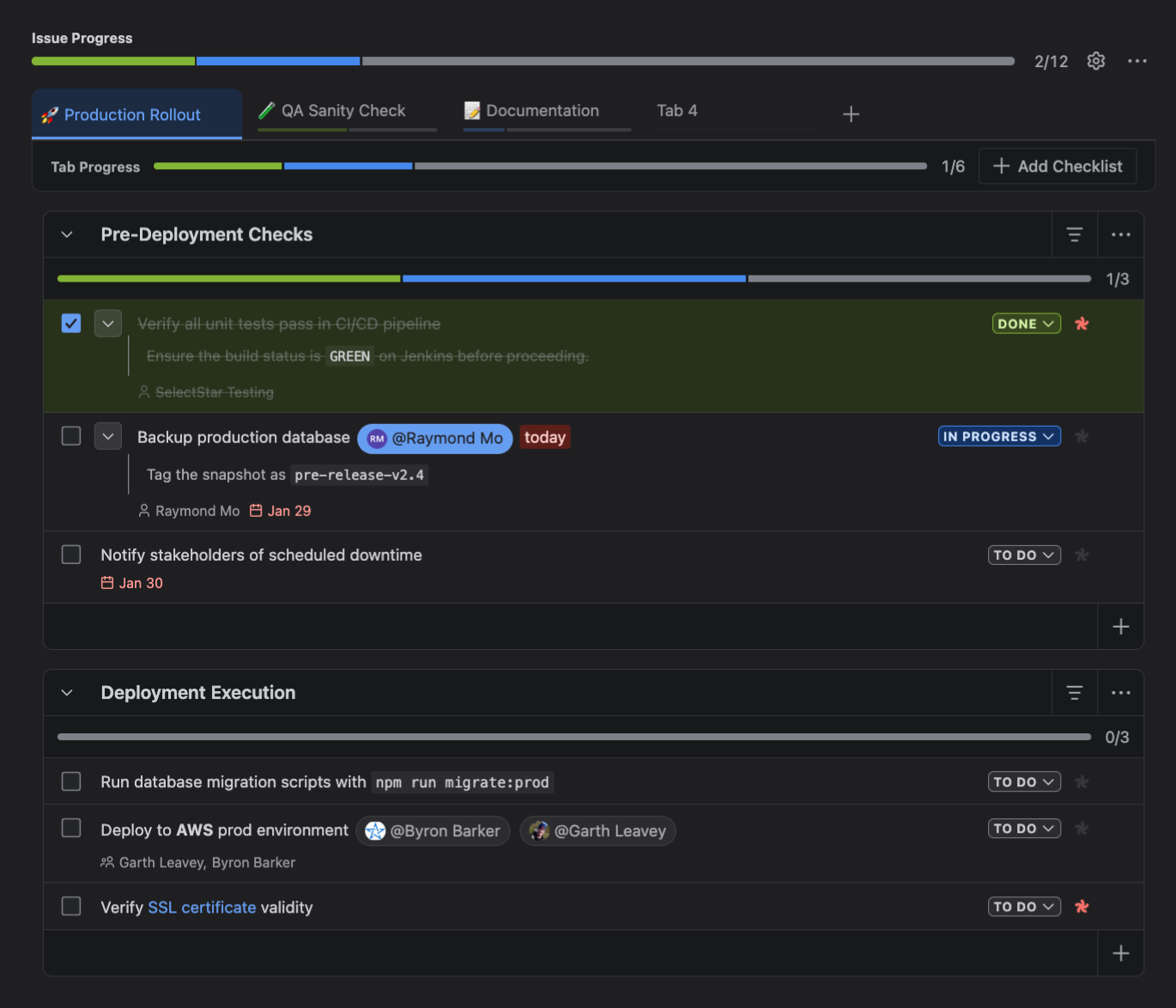
Main checklist interface. Dark-themed project management interface showing Issue Progress with tabs: Production Rollout, QA Sanity Check, Documentation, and Tab 4. Pre-Deployment Checks checklist has tasks with one done and two pending, including unit tests verified, backup production database tagged by Raymond Mo, and stakeholder notification scheduled. Deployment Execution checklist has tasks like running migration scripts, deploying to AWS prod environment, and verifying SSL certificate, all marked to do.
// Core
Mission Objectives: Simplified.
Eliminate subtask bloat
Break down work without the overhead of subtasks.
Partition complex workflow
Organize complex workflows with intuitive tabbed checklists.
Instant progress visibility
Track completion instantly with automatic progress bars.
Private checklists
Manage private to-dos in your own personal workspace.
// Organize
Tabbed Checklists
Separate your release phases with tabs to satisfy your inner neat-freak.

Interface showing tabs for Production Rollout, QA Sanity Check, and Documentation with progress bars below; Production Rollout tab is active.
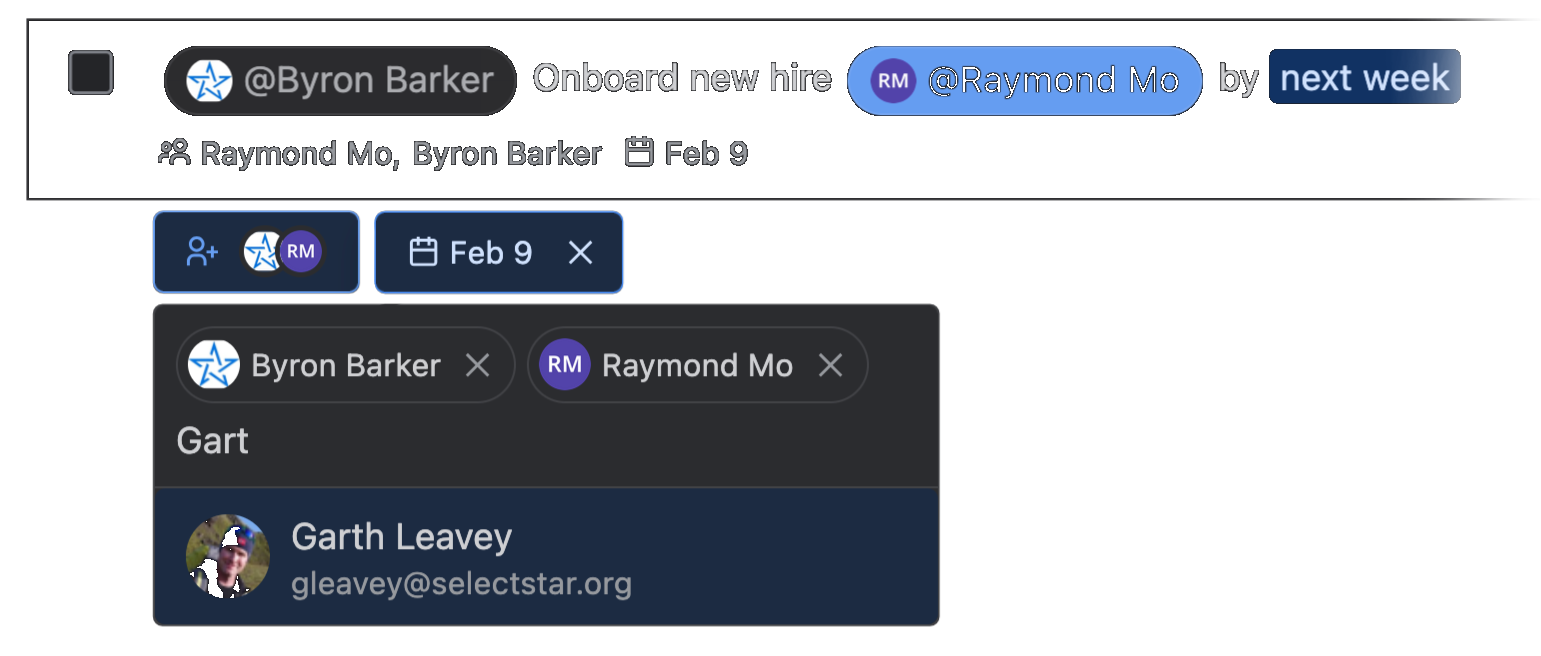
Task assignment interface showing Byron Barker being assigned to the onboarding of Raymond Mo due by next week, with a date tag Feb 9. A user picker menu is opened with a suggestion for Garth Leavey with email gleavey@selectstar.org.
// Collaborate
Assign & Track
Keep the mission on schedule. Easily assign tasks with user mentions, and set due dates with natural language. Or set them with their dedicated pickers.
// Rich Text
Formatted Tasks
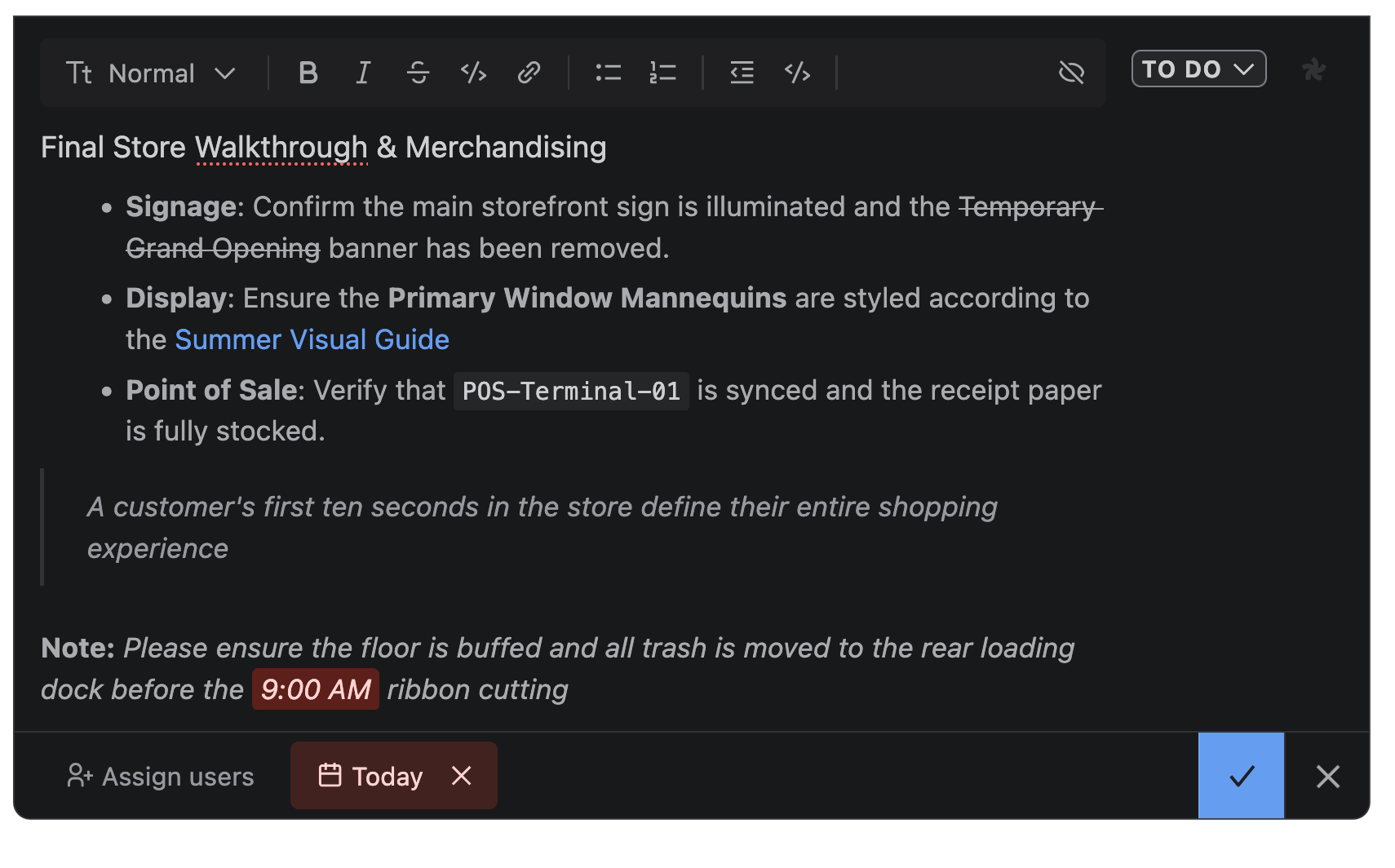
Add context where it matters with a rich text editor - headers, bullets, links, and more to give your crew the full briefing, not just a headline. Markdown supported.
Dark mode text editor showing a Final Store Walkthrough & Merchandising checklist with tasks on signage, display, and point of sale, plus notes on cleaning and ribbon cutting time at 9:00 AM, all formatted with various text formatting.
What else can Apollo do?

01

03

Title
Description
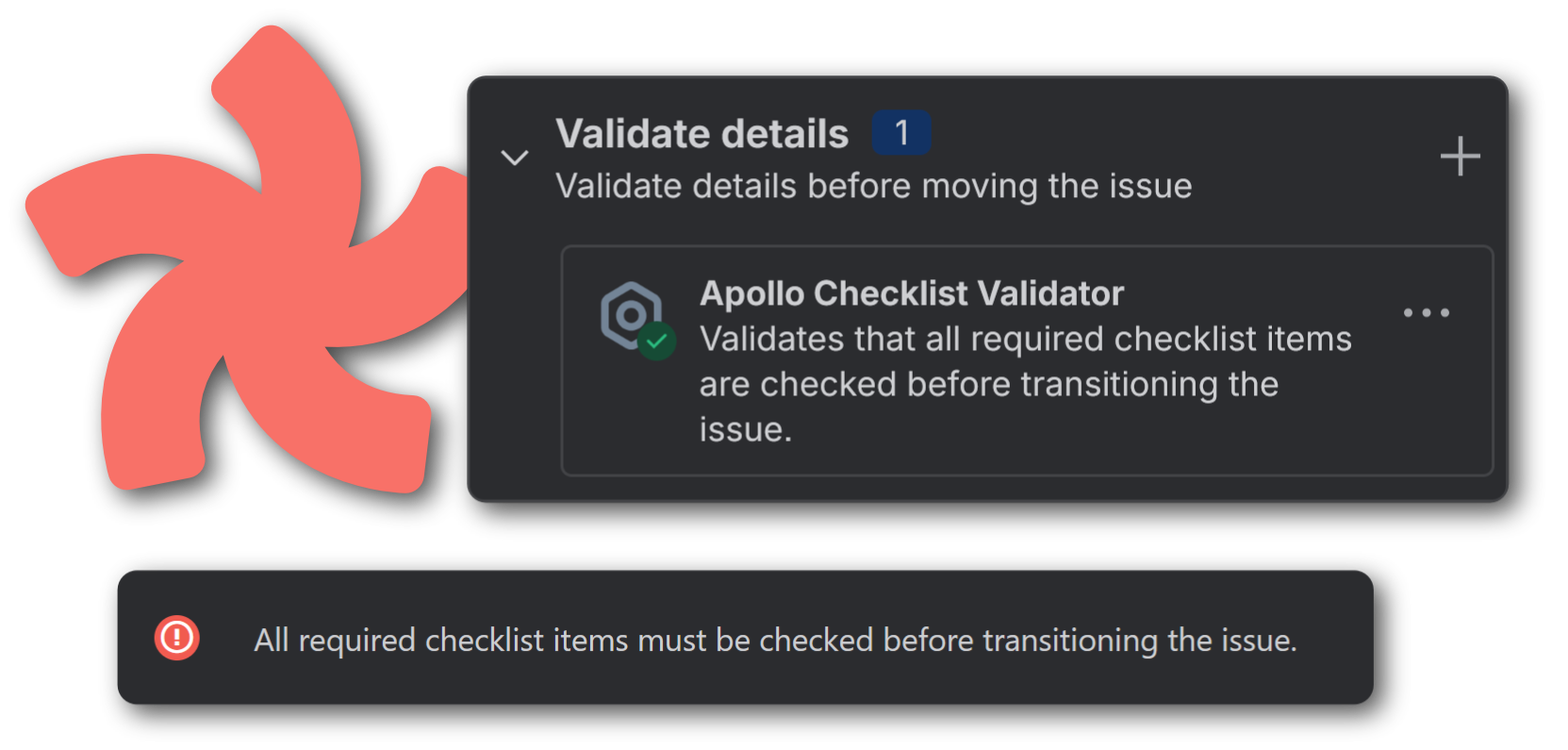
Interface showing 'Validate details' section with Apollo Checklist Validator confirming all required checklist items must be checked before transitioning the issue, including a red alert message.

// Workflow Validator

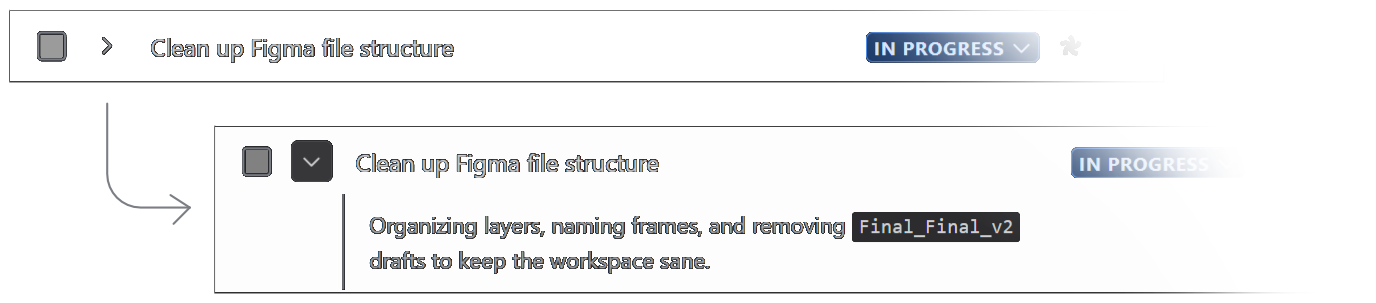
Task list showing 'Clean up Figma file structure' marked in progress with a expanded description explaining organizing layers, naming frames, and removing drafts labeled Final_Final_v2.

// Expandable & Collapsible Details

Jira Board with two columns: Selected for Development showing tasks 'Conduct user interviews' with 0 of 3 done in the Apollo checklist progress custom field and 'Sales deck pitch refresh' with 0 of 2 done, and In Progress showing 'Redesign Website' with 2 of 5 done and 'Create new design system' with 4 of 8 done.

// Custom Fields

...and many more to come!
Templates
Sorting
Assigned to You
History
Custom Permissions
Custom Statuses
We value your feedback. Help us calibrate Apollo into the perfect checklist app for your mission.
Give Feedback
Built on Forge
RUNS ON ATLASSIAN
Built on trusted infrastructure
Apollo is built natively on Atlassian’s Forge platform, ensuring enterprise-level reliability and seamless integration within your existing Jira environment.
Your data stays where it belongs
Privacy is paramount. Your data is stored and handled exclusively on Atlassian’s secure servers—nothing ever leaves their protected infrastructure.
Data residence compliant
Maintain full control over your information. Apollo supports standard data residency, allowing you to choose exactly where your data is stored.
Simple
Straightforward pricing
Free 30 Day Trial
Enterprise Support
One plan. No surprises. No paywalled features. See the marketplace listing pricing tab for the most accurate pricing.
Pricing
Ready for launch?
Apollo is free to try. Install it from the Atlassian Marketplace today.
FAQ
Everything you need to know about Apollo and how it works with Jira.
Does Apollo require setup?

No. Install Apollo from the Atlassian Marketplace and it's ready to use after the app initializes (It might take a couple minutes). There's no configuration needed.

Does Apollo work with Jira Server or Data Center?

Apollo is built for Jira Cloud only, with no plans to support Jira Server or Data center.

What happens to checklists if I uninstall?

If you uninstall Apollo, your checklists remain in a "soft-delete" phase. You'll have a few weeks to reinstall the app to restore access to your existing checklists. After this period, all your checklists will be deleted.

Can multiple checklists be created?

Yes! Multiple tabs and checklists can be created per issue. However, there are limits to be aware of.

Each issue has the following limits:
▸ Maximum of 5 tabs
▸ Maximum of 10 checklists per tab
▸ Maximum of 100 items per tab (shared across checklists in the same tab)

With a total max of 500 items per issue.


Personal checklists have the following limits:
▸ Maximum of 10 tabs
▸ Maximum of 10 checklists per tab
▸ Maximum of 100 items per tab (shared across checklists in the same tab)

With a total max of 1000 items in a personal checklist.

Need more help?
Reach out to our team for support.